Iterator Design Pattern in JavaScript (& TypeScript)

Photo by Henry & Co. on Unsplash
Intro
Hello, this is my third article on design patterns in javascript (and typescript), the first is Singleton, then Proxy, and this.
Feel free to read about those as well. So, let's move..
What Is Iterator Design Pattern (Diagram — function and class)
The definition you get for this question might depend on the source you are looking at.
For example:
Wikipedia says: In object-oriented programming, the iterator pattern is a design pattern in which an iterator is used to traverse a container and access the container's elements.
Gang of Four (Design Patterns: Elements of Reusable Object-Oriented Software) says: Provide a way to access the elements of an aggregate object sequentially without exposing its underlying representation.
If you studied the definition well, you will realise that both intersects and substitutable to a significant extent.
Although, the definition is given, it would be better to give a little explanation on what they meant to aid understanding.
The iterator pattern separates the collection (aggregate, list) from its implementation.
What is meant by the collection is a list of objects or data, or an object that contains that list or consist of items of which you can get a list from.
An example is a school object that has property of 'students', the school itself is not the list but it has the list. Another example might be a list of pens or pencils, so the collection might vary.
So, when you get that collection of data, you do not expose that data directly to the algorithm (or function) that would implement it, rather you build a boundary between the collection and the algorithm (or function) that actually utilizes it.
This might be for a different number of reasons which would be listed in the use case section.
For now, that's the iterator pattern.
In this article, I will be implementing both the class based sample in typescript and function based sample in javascript. The class diagram provided also shares both class based and function based sample
Iterator Design Pattern Diagram (function & class)
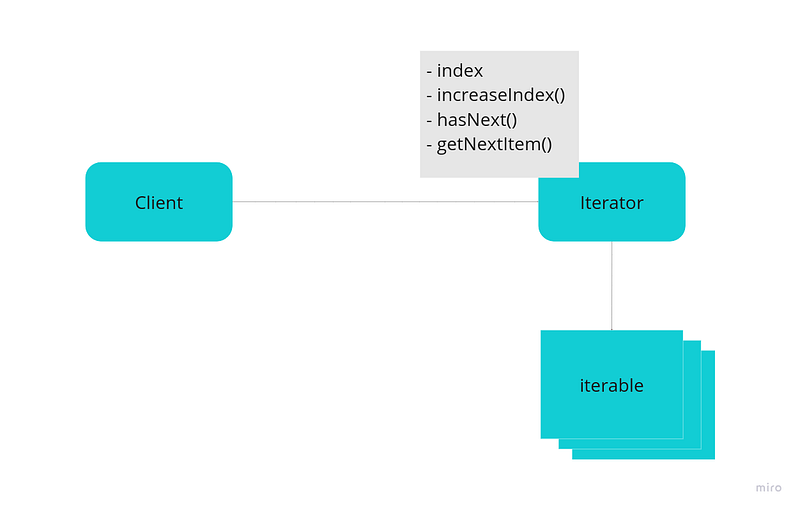 Iterator Pattern Function Based Sample
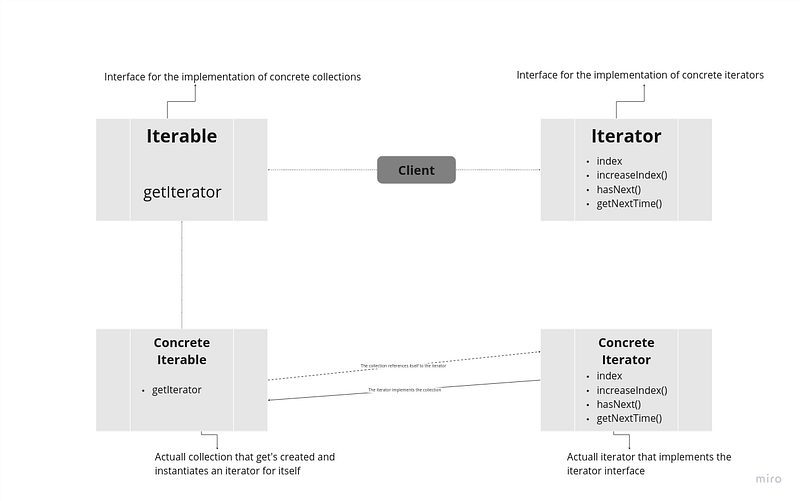 Iterator Pattern Class Based Sample
Components of Iterator Design Pattern (function & class)
Iterable
The collection of data that would be iterated over.
Iterator
The object/function that would be used to iterate over the data.
Client
The object that would be calling the iterator.
Interface
In class base implementation, this would give abstract definition of both the iterator and iterable which the actual classes (that would implement them) would follow.
Implementation of Iterator Design Pattern (function & class)
In javascript, to implement an iterator, there are two ways you can go about it.
- Generator function
- Custom implementation
Generator Function
function* iteratorWithGenerator(iterable) {
  if (!iterable || !iterable?.length) {
    return;
  }
  for (let i = 0; i < iterable.length; i++) {
    yield iterable[i];
  }
}

const iterable = [1, 3, 5, "sam", "will", "james"];

const instanceIterator = iteratorWithGenerator(iterable);

console.log(instanceIterator.next());
console.log(instanceIterator.next());

/* -- Result
{ value: 1, done: false }
{ value: 3, done: false }
*/
This is an inbuilt javascript function that provides the feature of an iterator. This function allows you to control iterations, write custom abstracted algorithms. To learn more about generator function, checkout MDN Docs
Little explanation, the generator function is declared and recognized by adding * between the function key and the function name (i.e, if you are to separate the function keyword and the *, you would still get the same thing).
Secondly, the next important part of the generator is the yield keyword, this keyword allows you to control the behavior of the function, it pauses the execution of the function until the next method is called.
Lastly, next method is used to execute the function until the next yield keyword is encountered.
Custom Implementation
Aside from the ready-made generator function, we can build our own custom iterator.
As I have said, we would be implementing the iterator pattern in two ways, functional approach and class-based approach.
Functional Based Implementation
const iterableObj = {
  items: ["one", 2, "you", true],
};

function Iterator(iter) {
  this.index = 0;

  this.iterable = iter.items;

  this.increaseIndex = function () {
    this.index += 1;
  };

  this.hasNext = function () {
    return this.index <= this.iterable.length - 1;
  };

  this.getNextItem = function () {
    if (this.hasNext()) {
      const current = this.iterable[this.index];
      this.increaseIndex();
      return current;
    }
    throw Error("List lenght exceeded...");
  };
}

const concreteIterator = new Iterator(iterableObj);

console.log(concreteIterator.getNextItem());
console.log(concreteIterator.getNextItem());
console.log(concreteIterator.getNextItem());

/* -- Result
one
2
you
*/
Explanation:
The iterableObj is holding a property of items which we want to iterate over.
So, for our Iterator function, we have:
- index: Which helps us keep track of our position of the iterable item.
- iterable: Which holds the reference to our iterable item, this variable can be derived in a different manner depending on the structure of the iterableObj and the type of item you want to iterate over.
- increaseIndex: This function handles the increment of the index variable, such that each time we call the
getNextItemmethod, we would call it. - hasNext: This function returns a boolean value that helps us determine whether we have something to iterate over or not.
- getNextItem: This function after doing some validation and verification returns the next item on the iterable list.
- concreteIterator: This is an instance of the Iterator function, which
iterableObjis the collection which we would use it to iterate over.
NB: This implementation is how I decided to implement the iterator, yours might be different, just make sure to grab the heart of the iterator pattern in your implementation.
Class Based Implementation
interface IteratorInterface {
  hasNext: () => boolean;
  getNextItem: () => string | null;
  increaseIndex: () => void;
  index: number;
}

type items = string[];

interface IterableInterface {
  readonly items: items;
  getIterator: () => ConcreteIterator;
}

class ConcreteIterator implements IteratorInterface {
  iter: items;
  index: number;

  constructor(iterList: IterableInterface) {
    this.index = 0;
    this.iter = iterList.items;
  }

  increaseIndex = () => {
    if (this.index <= this.iter.length - 1) {
      this.index += 1;
    }
  };

  hasNext = () => {
    return this.index <= this.iter.length - 1;
  };

  getNextItem = () => {
    if (this.index >= this.iter.length) {
      return null;
    }
    const curr = this.iter[this.index];
    this.increaseIndex();
    return curr;
  };
}

const iterableObject: IterableInterface = {
  items: ["s", "d", "e", "f"],
  getIterator: () => {
    return new ConcreteIterator(iterableObject);
  },
};

const client = () => {
  const iterabler = iterableObject.getIterator();

  while (iterabler.hasNext()) {
    console.log(iterabler.getNextItem());
  }
};

client();

/* -- Result
s
d
e
f
*/
Explanation:
- IteratorInterface: This provides an abstract which other concrete interfaces can implement, think of it as a template whose pattern other actual iterators (such as the
ConcreteIterator) are going to follow. - IterableInterface: This performs the same function as
IteratorInterfacebut for the actual iterable items (such asiterableObject). - ConcreteIterator: This is an implementation of the
IteratorInterface, and has a concrete definition of the properties and methods to work for a certain iterable object. The methods acts the same way as explained in the function base implementation. - iterableObject: This is an implementation of the
IterableInterface, and also has a concrete definition of the properties and methods that's suitable for itself. - Client: This is the function that utilizes the concrete iterator generated from the
iterableObject'sgetIteratormethod.
Use Cases
- When you want to encapsulate the underlying structure of the data from the client implementing or using that data
- When you need control over when and where certain data traversal should performed
- When you need custom traversal algorithm for your collection
Advantages (Pros) of Iterator Design Pattern
- Encapsulation of collection structure — hides the underlying representation of the aggregate
- Capability to work with Infinite list — iterate over streams or infinite sequences
- Keeping control of the iteration — supports pause, resume, and custom traversal logic
To go deeper, visit here
Disadvantages (Cons) of Iterator Design Pattern
- Extra work — requires implementing iterator logic alongside the collection
- Could cause performance issue when dealing with complex data structures
To go deeper, visit here