Why Latency Lives in the Layers: A Practical OSI Model Breakdown
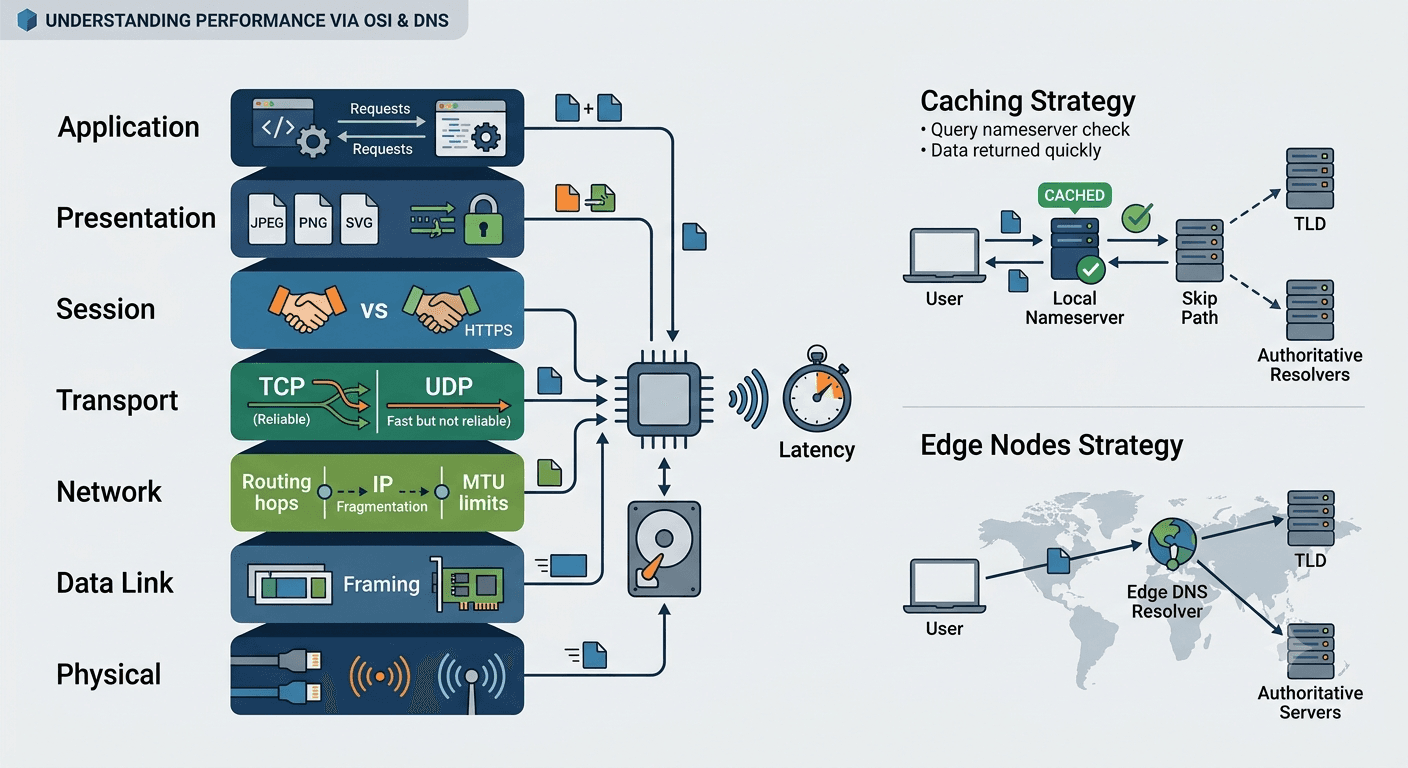
Performance can be broadly classified into processing speed and storage usage. Both ultimately affect latency — a topic worth its own deep dive.
One of the most detailed ways to analyze latency is by using the OSI model.
Application — Presentation — Session — Transport — Network — Data Link — Physical
Most engineers only know the Application layer well, and that is fair. The other layers are stable and rarely turn out to be the major bottleneck. But when they do, understanding them makes the difference between guessing and diagnosing.
Here is how each layer affects your performance.
Application Layer
This is your codebase. Code quality determines your performance. You decide a lot that propagates downward over the network here — whether you use HTTP or DNS, how you structure requests, how you handle serialization. Every decision at this layer shapes what happens below.
Presentation Layer
This layer encodes data into a format that fits the incoming data. Your asset type — JPEG, PNG, SVG, text, encryption — influences encoding speed. Heavier formats mean more processing time here.
Session Layer
This is where a communication session is established. If you use HTTP without the S, you skip TLS handshake overhead at this layer (and encryption at the Presentation layer). Less processing time, but not secure. A deliberate tradeoff depending on your threat model.
Transport Layer
This is where the transport protocol is chosen. HTTP binds you to TCP. DNS uses UDP. UDP is faster but not reliable. If your application can tolerate some data loss, UDP gives you lower latency by skipping the handshake and retransmission machinery TCP requires.
Network Layer
To me, this is one of the most stable layers — silent but critical. It handles IP fragmentation: splitting data when it exceeds the Maximum Transmission Unit (MTU). Performance bottlenecks here are IP fragmentation (if data exceeds MTU) and routing hops. Fragmentation means the receiving end must reassemble, and if any fragment is lost, the entire packet is discarded.
Data Link Layer
This layer determines the maximum packet size (MTU) you can receive. If incoming data exceeds the MTU, fragments can get lost at the Network Layer, forcing re-fetches. This effectively constrains your bandwidth even when the network is fast.
On DNS Resolution
DNS resolution plays out differently depending on the network.
On an internal network, no external DNS resolver is needed. Your domain name is irrelevant — you request directly from a server within the network and get a response. Latency is very low.
When making a request from a client to a server on a different network using a domain name, the resolver chain kicks in: your domain nameserver, the TLD nameserver, and the authoritative (ultimate) resolver.
There are two popular optimization strategies: caching and edge nodes. They reduce latency through different mechanisms.
If your nameserver caches (most do) and your TTL is not exceeded, there is no need to reach the authoritative resolver. This saves latency by reducing the number of network requests.
If your nameserver uses edge nodes and redirects resolution requests to nearby resolvers, it saves latency by reducing network round-trip wait time.
Understanding how different layers influence your system's performance is critical. But what is more critical is knowing how to evaluate your website and identify where the bottleneck actually lives. That part is not optional.